5 Affordable Calculator Builders for Small Businesses in 2026
Interactive calculators have become one of the most practical conversion tools a small business can add to a website in 2026 — and the reason is simple: people want to know what something costs before they talk to anyone.
A “Request a Quote” form asks for commitment before giving anything back. A calculator does the opposite. It answers the visitor’s real question — what will this actually cost me? — and in exchange, you learn what they need, what they’re willing to spend, and whether they’re worth following up with. That’s a better trade for both sides.
For service businesses, the impact is concrete: fewer calls spent explaining pricing from scratch, fewer leads that go cold after seeing a number they weren’t expecting, and more inquiries that arrive with realistic expectations already set.
The best affordable calculator builders don’t just do math. They capture lead details at the right moment, send data to your email or CRM, support conditional logic (so the calculator adapts based on what the visitor selects), and embed cleanly on any site without a developer. The tools in this list do all of that — at price points that make sense for small teams.
Below are five options ranked by value for money, ease of setup, and how effectively they turn pricing curiosity into qualified leads. All five can be deployed in a day.

1. uCalc — Best All-Around Choice for Small Business Calculators
If your goal is straightforward — embed a calculator, capture leads, connect it to your workflow — uCalc is the most balanced option in this price range. It’s built specifically for calculators rather than general forms, which means the features that matter most (conditional logic, result display, lead gates, integrations) are first-class citizens rather than afterthoughts.
What the builder actually looks like
The editor works through a visual canvas: you add input elements — sliders, dropdowns, number fields, checkboxes, image selectors — and connect them to formula outputs through a point-and-click node system. No spreadsheet syntax, no code. Conditional visibility lets you show or hide fields based on what the visitor selected earlier, which keeps complex calculators from feeling overwhelming.
The lead capture mechanism is one of uCalc’s cleaner implementations: you position an email field either before the result (“enter your details to see your estimate”) or after it (“save your results”). Every submission is tagged with the full input context — so your CRM receives not just an email address, but exactly what the person was calculating.
Integrations: Google Sheets, Mailchimp, Telegram, GetResponse, Zapier (which covers most CRMs), and webhooks on higher plans. The Telegram integration is particularly useful for local service businesses that manage client communication through messenger apps.
Best for: service pricing calculators (cleaning, renovation, repairs), shipping and add-on estimators, lead-qualifying flows where budget range and project scope matter.
Pricing: Basic $7.20/mo · Standard $17.60/mo · Pro $40/mo. Free trial available.
Where it falls short: not the right tool if you need payment processing built directly into the calculator flow, or if your calculation logic requires deeply nested multi-variable formulas. For those cases, see Calculoid below.
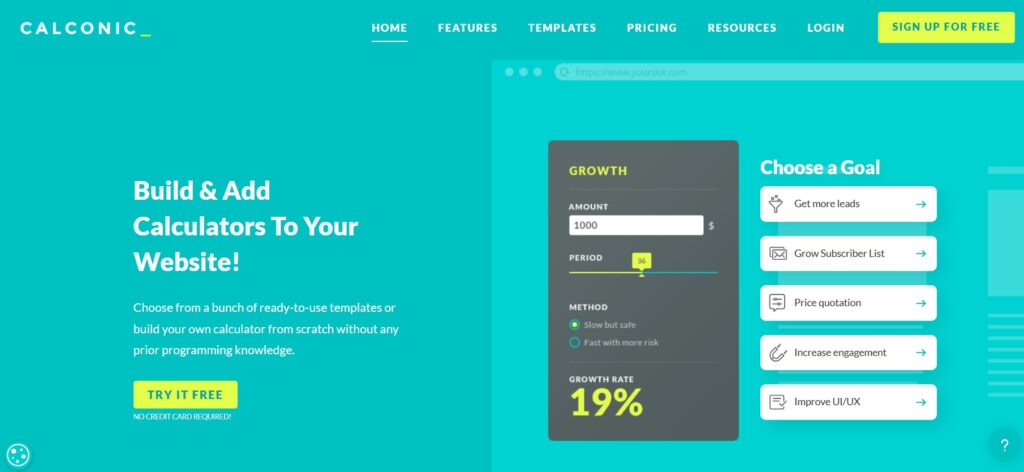
2. Calconic — Lowest-Cost Entry for a Dedicated Calculator Builder
Calconic is the right answer to a specific question: what’s the cheapest way to get a properly designed, brandable calculator embedded on my site? At $5/month billed annually, it’s the most affordable paid entry point in the dedicated calculator builder category.
What the builder actually looks like
Calconic’s editor gives you layout control that goes further than most competitors at this price: section-level background colors, per-element padding, border radius adjustments, and responsive preview inside the editor. The result is a calculator that can match your site’s visual identity without custom CSS. The logic layer handles conditional visibility — fields show or hide based on prior selections — which covers most standard pricing scenarios: tiered services, add-on combinations, quantity-based scaling.
The template library covers 60+ use cases: construction quotes, cleaning service pricing, mortgage calculators, SaaS subscription configurators. For most small businesses, a template gets you 80% of the way there; you’re adjusting labels and formula values rather than building from scratch.
Integrations: email notifications, Google Analytics, Zapier, and direct Shopify/WooCommerce connections. The Shopify integration is worth noting: a product configurator can push a calculated price directly into a cart without a redirect.
Best for: businesses that need one or two clean, visually polished calculators on a pricing or service page. Especially strong for agencies building calculators for design-sensitive clients.
Pricing: Free plan available · Paid from $5/mo (annual) / $12/mo (monthly).
Where it falls short: plan limits are tied to impressions (page loads, not just submissions). A calculator embedded on a high-traffic SEO page can exhaust a lower plan faster than expected — check your expected monthly traffic before choosing a tier.

3. stepFORM — Best for Quiz-Style Funnels That End With a Price
stepFORM sits at the intersection of lead-gen quiz builder and calculator. The core experience is different from the other tools here: instead of a widget where visitors fill fields and see a live result, stepFORM guides them through a sequence of screens — one question at a time — that ends with a quote, recommendation, or next step.
What the builder actually looks like
The editor supports 18+ field types including image-choice questions, slider inputs, conditional branching, and automated cost calculations. The multi-step format keeps engagement high because visitors never face a wall of fields — each screen is a single decision. That structure also gives you natural breakpoints to collect lead info: typically after 2–3 qualifying questions, before revealing the result.
The channel flexibility is worth highlighting for small businesses: stepFORM flows can be shared not just as website embeds but as direct links for social media and messenger campaigns. If your acquisition happens through Instagram DMs or Facebook groups, a link-based calculator funnel is often more practical than an embedded widget.
Best for: “answer a few questions → get an estimate” flows, lead qualification funnels where service type and urgency matter, businesses whose pricing depends on several variables that are easier to walk through step by step.
Pricing: Free $0 · Beginner $11.20/mo · Pro $20.80/mo.
Where it falls short: if you need a classic embedded calculator widget that updates results in real time as visitors interact — without page transitions — stepFORM’s sequential format won’t deliver that experience. It’s a funnel, not a widget.
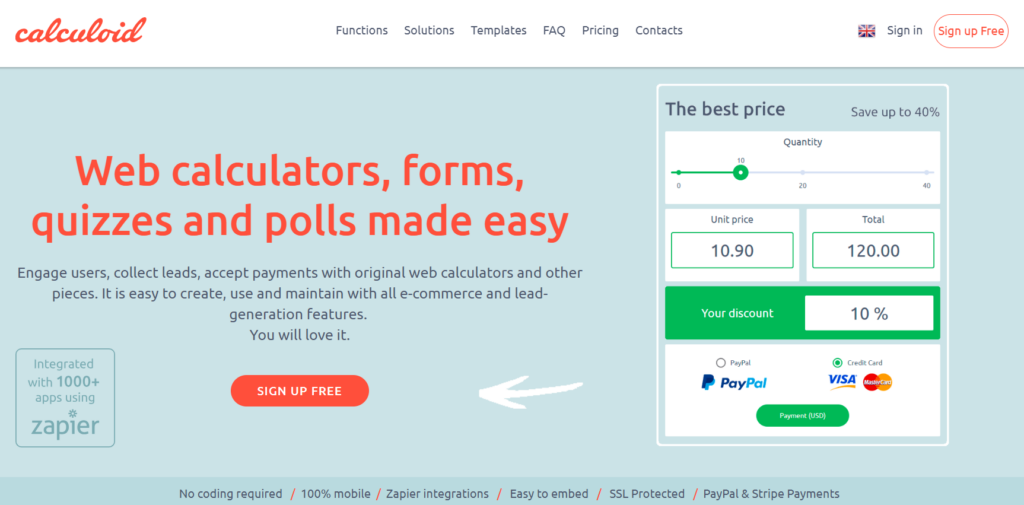
4. Calculoid — Best for Complex Logic and Payment-Ready Calculators
Calculoid is the most formula-capable tool in this list. Where others use visual node editors or simplified condition builders, Calculoid works like a spreadsheet mapped to form fields: each input has a variable name, and you write calculation rules that reference those variables directly. If your pricing model involves multi-step formulas, parallel outputs, or nested conditional logic, Calculoid handles it without workarounds.
What the builder actually looks like
The formula system is the differentiator. A cleaning service calculator that factors in square footage, room type, frequency discount, and add-on services — with three different output fields showing base price, discount, and total — is a straightforward build in Calculoid. The same logic would require workarounds in simpler tools.
Beyond the formula layer, Calculoid logs individual submissions with full input sets. Your team can see that a specific lead calculated a quote for a 200sqm office with weekly service — and follow up with exactly that context. For higher-value service businesses, this changes the first conversation.
Payment processing (Stripe and PayPal) is built natively into the calculator flow — a visitor can configure their options, see the total, and pay without leaving the page.
Best for: businesses with genuinely complex pricing logic, service packages with many variable components, and any use case where the calculator needs to function as a lightweight checkout.
Pricing: Lead Generation $19/mo · High Traffic & E-commerce $39/mo · Agency from $99/mo.
Where it falls short: the formula system has a learning curve. If you’re not comfortable with spreadsheet-style logic, expect to spend more setup time than with uCalc or Calconic. The visual design layer is also more functional than polished — if brand presentation matters, Calconic is the better fit.

5. Jotform — Most Flexible, But Right Only for Specific Situations
Jotform is a full form and workflow platform that supports calculator-style functionality — but it’s not a calculator builder. That distinction matters in practice: you start from a form template and add pricing fields, conditional logic, and running totals as form elements. The result works, but it reads as a form with a total at the bottom, not an interactive calculator that updates in real time.
When that’s actually fine
For businesses that already use Jotform for intake, payments, approvals, or client onboarding — adding calculator logic to an existing form workflow is genuinely efficient. You’re not managing a second tool, and the 100+ integrations (Google Drive, Salesforce, HubSpot, Slack, Stripe) are available for every form type including calculator-style ones.
Jotform’s calculation widgets handle standard scenarios well: quantity × price, conditional service add-ons, running totals with tax. For invoice-style interactions or structured client intake with pricing components, it’s a practical choice.
Where the economics break down for small businesses
The free plan caps at 100 submissions per month — fine for testing, not for a live pricing calculator on an active site. The first paid tier (Bronze, $34/mo) unlocks more submissions but is meaningfully more expensive than any dedicated calculator builder in this list. If a calculator is your primary need, you’re paying for a lot of platform you won’t use.
Best for: businesses already embedded in the Jotform ecosystem, or teams that need calculator logic inside a broader form workflow (multi-step intake, payment + service selection in one flow).
Pricing: Starter free · Bronze $34/mo · Silver $39/mo · Gold $99/mo (annual billing).
How to Choose — The Short Version
Your pricing logic is straightforward and you want something live this week: start with uCalc. Largest template library in the dedicated calculator category, lowest friction from signup to published, and a lead capture layer that’s better implemented than most tools at twice the price.
You need the cheapest possible paid plan with no branding: Calconic at $5/month (annual) is hard to beat. It won’t have every feature, but for one or two clean embedded calculators on a small business site, it covers everything that matters.
Your pricing involves a guided questionnaire — multiple questions before a quote: stepFORM. The sequential format outperforms static widgets for complex services where visitors need to think through their options before seeing a number.
Your formula logic is complex, or you need visitors to be able to pay directly inside the calculator: Calculoid. It’s not the cheapest, but it’s the only tool here where the calculation layer doesn’t become a limitation.
You’re already using Jotform for other forms and workflows: add calculator logic there rather than introducing a fifth tool. If Jotform isn’t already part of your stack, it’s probably more platform than you need for this specific job.
One question that cuts through most of the noise: after a visitor submits the calculator, what needs to happen next? If the answer is “send them an email and notify my team” — any of the first three tools handles it. If the answer is “charge them and create a CRM deal automatically” — go straight to Calculoid.